> ## Documentation Index
> Fetch the complete documentation index at: https://docs.timothe.ai/llms.txt
> Use this file to discover all available pages before exploring further.
# TimeRex の埋め込み
> TimeRex の日程調整ページをエージェントウィジェットに埋め込む方法
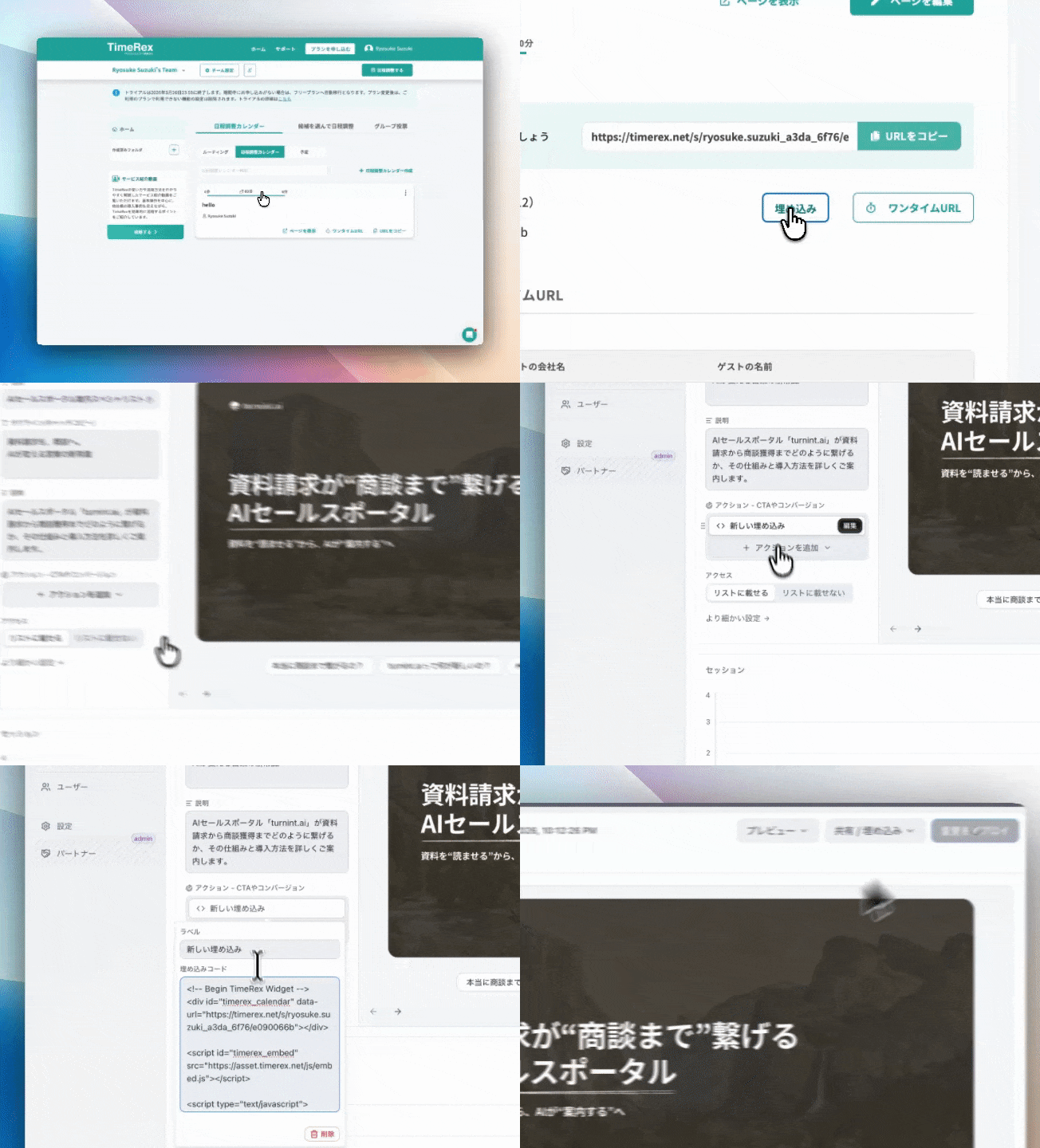 [TimeRex](https://timerex.net) の日程調整ページをウィジェット内に埋め込み、エンドユーザーがその場で日程調整できるようにします。
## 前提条件
* TimeRex アカウント
* 公開済みの日程調整カレンダー
## 埋め込みコードの取得
1. TimeRex にログイン
2. 対象の **日程調整カレンダー** を開く
3. 「埋め込み」ボタンをクリック
4. 埋め込みコードをコピー
## 設定
ダッシュボードの **エージェント設定 > アクション > アクションを追加 > 埋め込みコード** を選択し、以下のように設定します。
| 項目 | 値の例 |
| --- | ---------- |
| ラベル | 日程を調整する |
| コード | 以下の埋め込みコード |
```html theme={null}
```
[TimeRex](https://timerex.net) の日程調整ページをウィジェット内に埋め込み、エンドユーザーがその場で日程調整できるようにします。
## 前提条件
* TimeRex アカウント
* 公開済みの日程調整カレンダー
## 埋め込みコードの取得
1. TimeRex にログイン
2. 対象の **日程調整カレンダー** を開く
3. 「埋め込み」ボタンをクリック
4. 埋め込みコードをコピー
## 設定
ダッシュボードの **エージェント設定 > アクション > アクションを追加 > 埋め込みコード** を選択し、以下のように設定します。
| 項目 | 値の例 |
| --- | ---------- |
| ラベル | 日程を調整する |
| コード | 以下の埋め込みコード |
```html theme={null}
```